Django-Ninja

官方文档

Django-Ninja:https://django-ninja.dev/

项目初始化

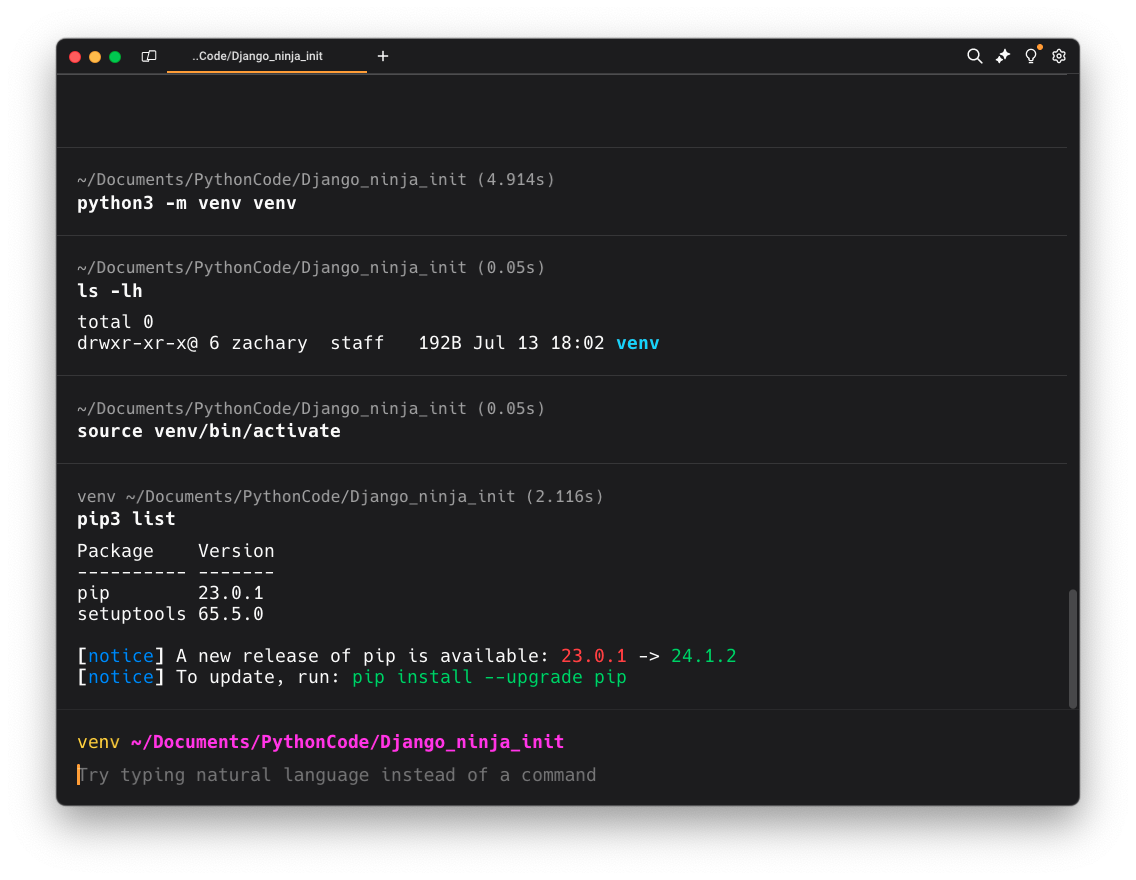
创建虚拟环境

python3 -m venv venv

激活虚拟环境

Windows:venv/Script/activate

Mac/Linux:source venv/bin/activate
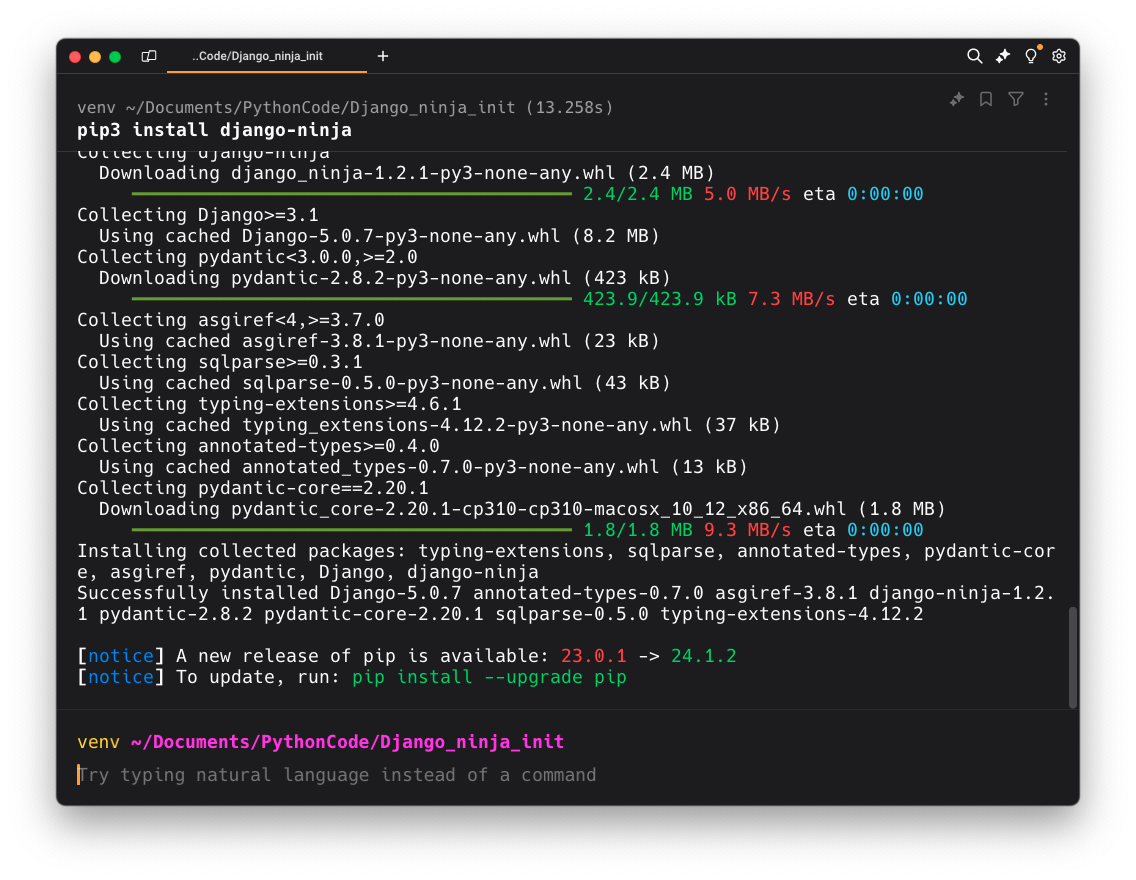
安装 Django-ninja

在安装 Django-ninja 的时候,其实还会安装 Django

pip3 install django-ninja
创建 ninja 应用

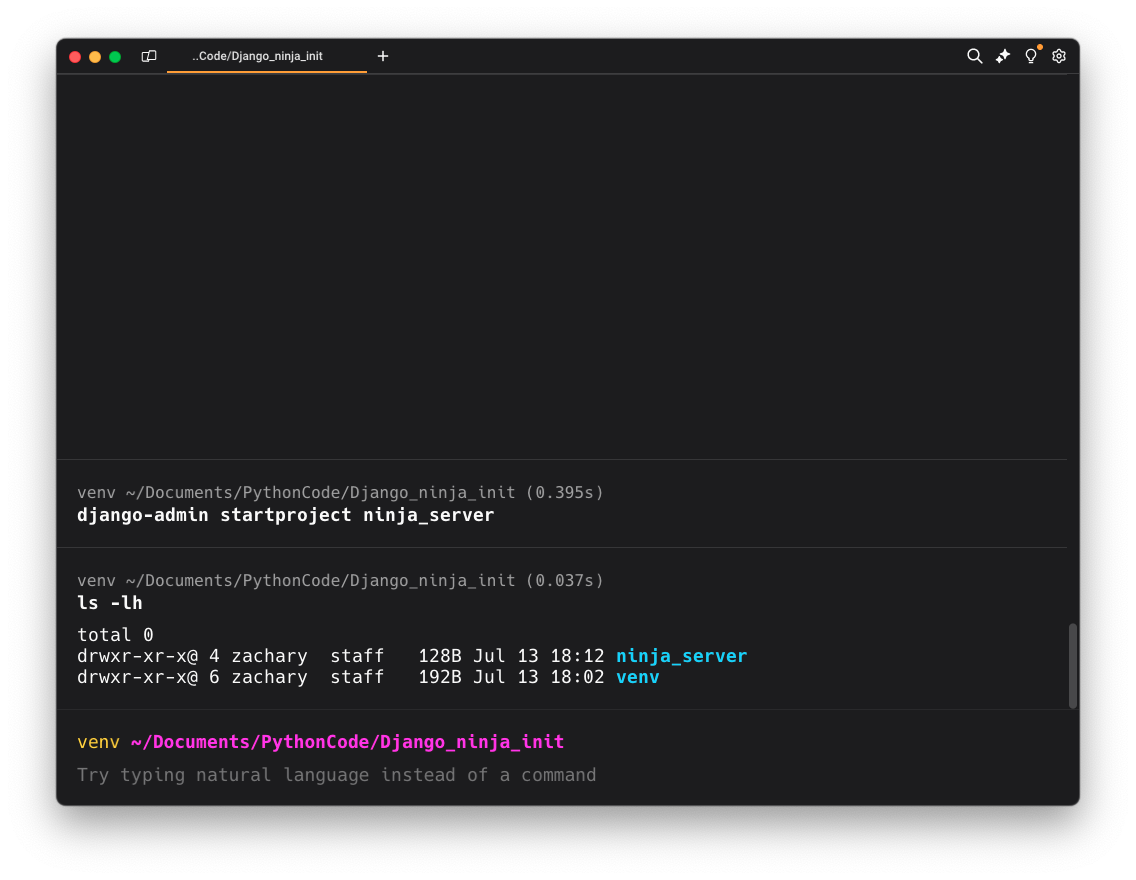
使用<font style="color:rgb(54, 70, 78);background-color:rgb(245, 245, 245);">django-admin startproject [应用名]</font>创建应用

这里创建了一个名为<font style="color:rgb(54, 70, 78);background-color:rgb(245, 245, 245);">ninja_server</font>的应用
打开项目

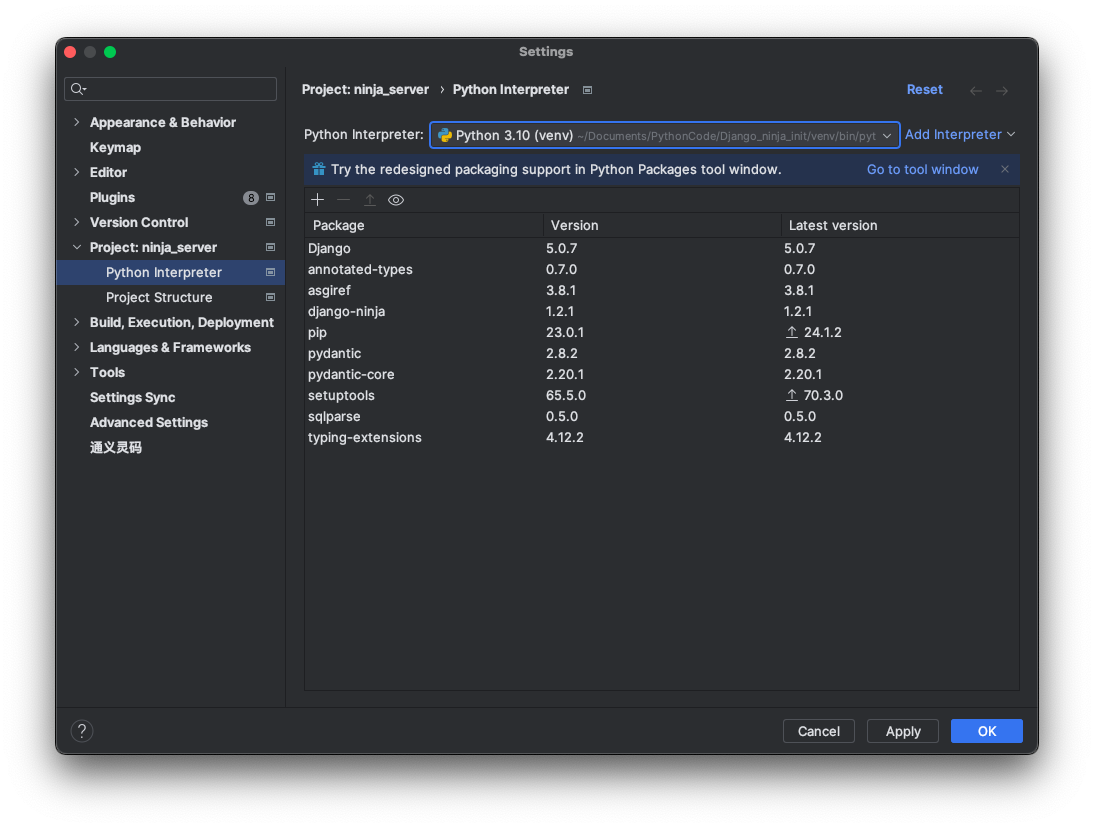
使用 PyCharm 打开创建的项目,即直接打开ninja_server即可,然后解释器记得选择创建的虚拟环境下的解释器
Hello World

在/ninja_server 下的 urls.py 后面添加

1
2
3
4
5
6
7
8
9
10
11
12
13
14
15
16
17
18
19
20
21
22
23
24
25
26
27
28
29
30
31
32
33
34
"""
URL configuration for ninja_server project.

The `urlpatterns` list routes URLs to views. For more information please see:
https://docs.djangoproject.com/en/5.0/topics/http/urls/
Examples:
Function views
1. Add an import: from my_app import views
2. Add a URL to urlpatterns: path('', views.home, name='home')
Class-based views
1. Add an import: from other_app.views import Home
2. Add a URL to urlpatterns: path('', Home.as_view(), name='home')
Including another URLconf
1. Import the include() function: from django.urls import include, path
2. Add a URL to urlpatterns: path('blog/', include('blog.urls'))
"""
from django.contrib import admin
from django.urls import path
from ninja import NinjaAPI

urlpatterns = [
path('admin/', admin.site.urls),
]

api = NinjaAPI()


@api.get("/hello")
def hello_world(request):
return {'hello': 'world'}


urlpatterns += [path('api/', api.urls)]

然后启动项目

  • 命令行启动

python3 manage.py runserver

1
2
3
4
5
6
7
8
9
10
11
12
13
14
(venv) ➜  ninja_server
(venv) ➜ ninja_server python3 manage.py runserver
Watching for file changes with StatReloader
Performing system checks...

System check identified no issues (0 silenced).

You have 18 unapplied migration(s). Your project may not work properly until you apply the migrations for app(s): admin, auth, contenttypes, sessions.
Run 'python manage.py migrate' to apply them.
July 13, 2024 - 10:26:13
Django version 5.0.7, using settings 'ninja_server.settings'
Starting development server at http://127.0.0.1:8000/
Quit the server with CONTROL-C.

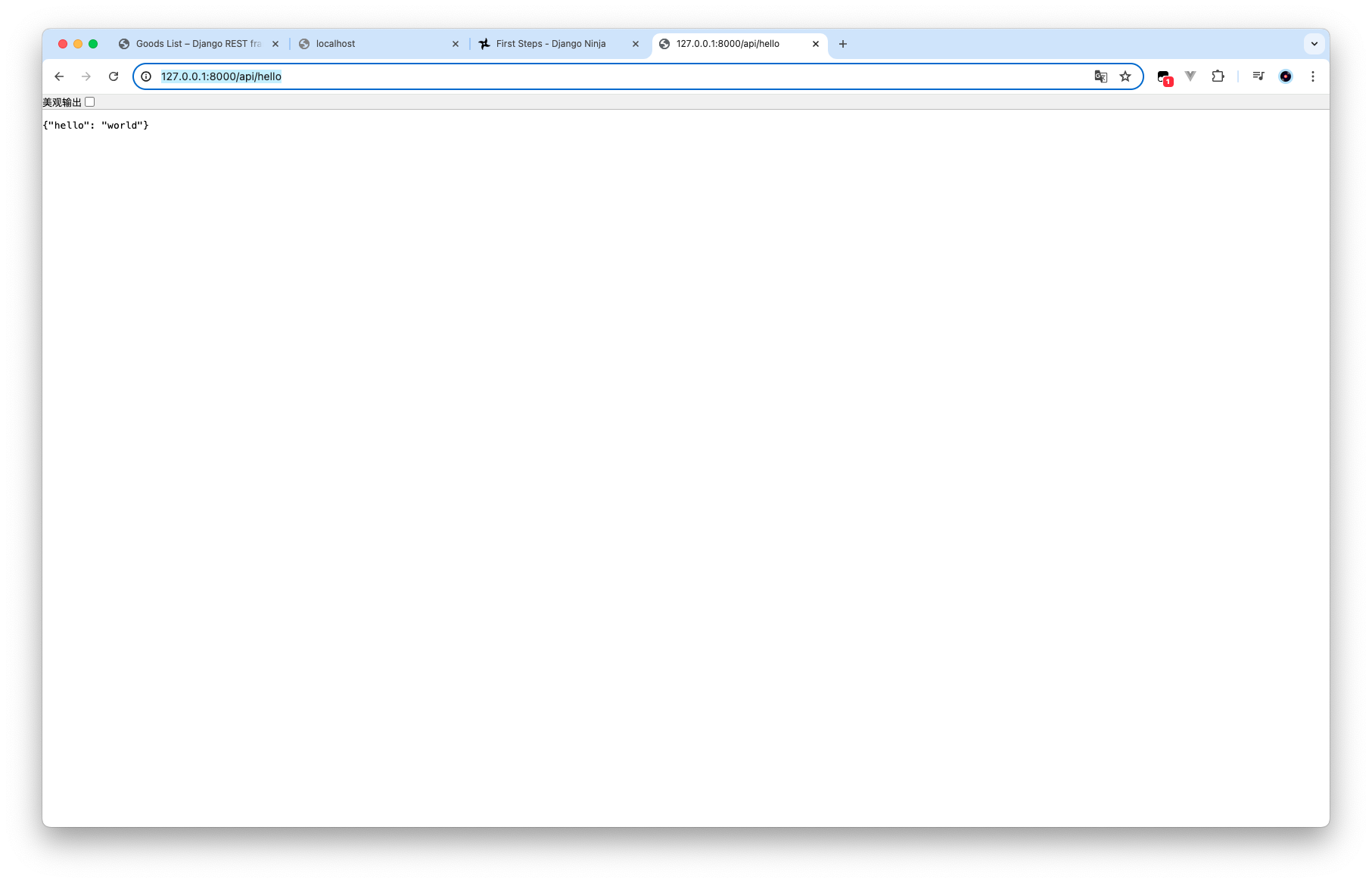
之后在浏览器输入http://127.0.0.1:8000/api/hello
  • 直接启动

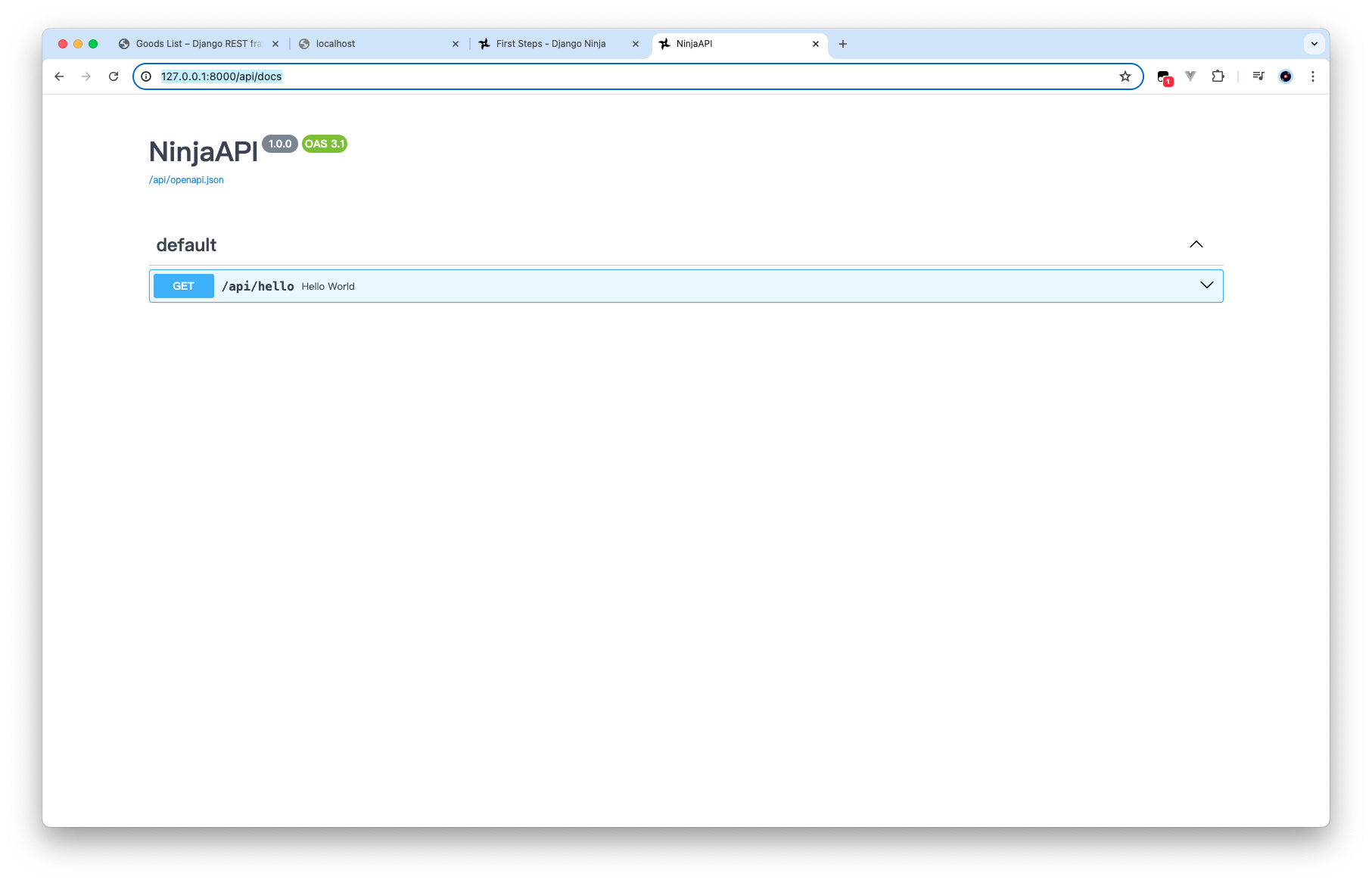
查看文档

直接通过http://127.0.0.1:8000/api/docs可以查看官方文档
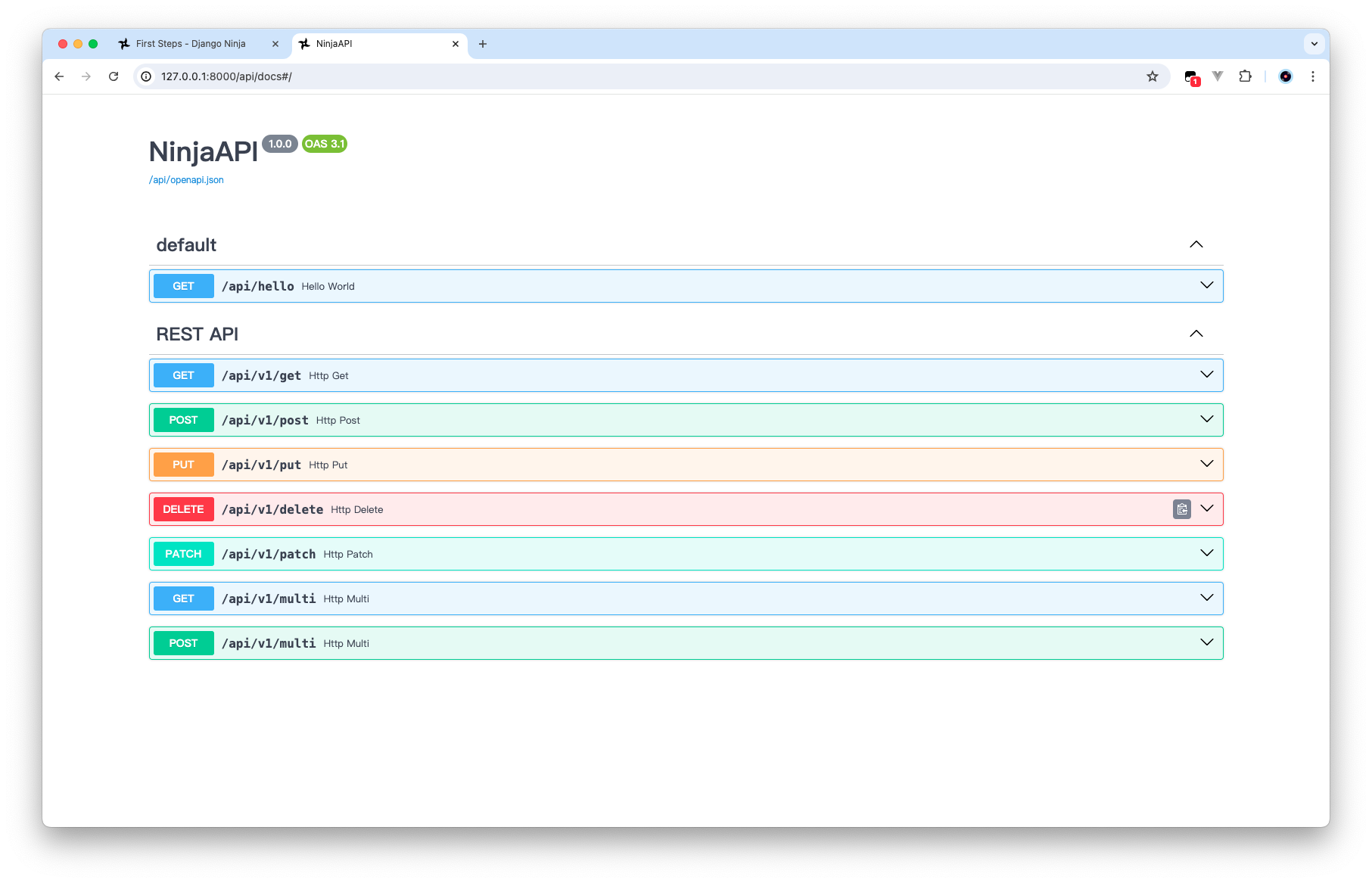
路由、视图、常用请求

在 Django-ninja 中的路由配置,与 fastapi 类似

在项目目录下面创建一个 router.py

1
2
3
4
5
6
7
8
9
10
11
12
13
14
15
16
17
18
19
20
21
22
23
24
25
26
27
28
29
30
31
32
33
34
35
36
37
38
39
40
41
# -*- coding:utf-8 -*-
# Author: Zachary
from django.http import HttpRequest
from ninja import Router

REST = Router(tags=["REST API"])


@REST.get("/get")
def http_get(request: HttpRequest):
return {"get": "OK"}


@REST.post("/post")
def http_post(request: HttpRequest):
return {"post": "OK"}


@REST.put("/put")
def http_put(request: HttpRequest):
return {"put": "OK"}


@REST.delete("/delete")
def http_delete(request: HttpRequest):
return {"delete": "OK"}


@REST.patch("/patch")
def http_patch(request: HttpRequest):
return {"patch": "OK"}


@REST.api_operation(methods=["GET", "POST"], path="/multi")
def http_multi(request: HttpRequest):
if request.method == "GET":
pass
elif request.method == "POST":
pass
else:
raise Exception

视图的第一个参数,必须是request: HttpRequest

然后修改 urls.py

1
2
3
4
5
6
7
8
9
10
11
12
13
14
15
16
17
18
19
20
21
22
23
24
25
26
27
28
29
30
31
32
33
34
35
36
37
38
"""
URL configuration for ninja_server project.

The `urlpatterns` list routes URLs to views. For more information please see:
https://docs.djangoproject.com/en/5.0/topics/http/urls/
Examples:
Function views
1. Add an import: from my_app import views
2. Add a URL to urlpatterns: path('', views.home, name='home')
Class-based views
1. Add an import: from other_app.views import Home
2. Add a URL to urlpatterns: path('', Home.as_view(), name='home')
Including another URLconf
1. Import the include() function: from django.urls import include, path
2. Add a URL to urlpatterns: path('blog/', include('blog.urls'))
"""
from django.contrib import admin
from django.urls import path
from ninja import NinjaAPI

from router import REST

urlpatterns = [
path('admin/', admin.site.urls),
]

api = NinjaAPI()


@api.get("/hello")
def hello_world(request):
return {'hello': 'world'}


api.add_router(prefix="v1/", router=REST)

urlpatterns += [path('api/', api.urls)]

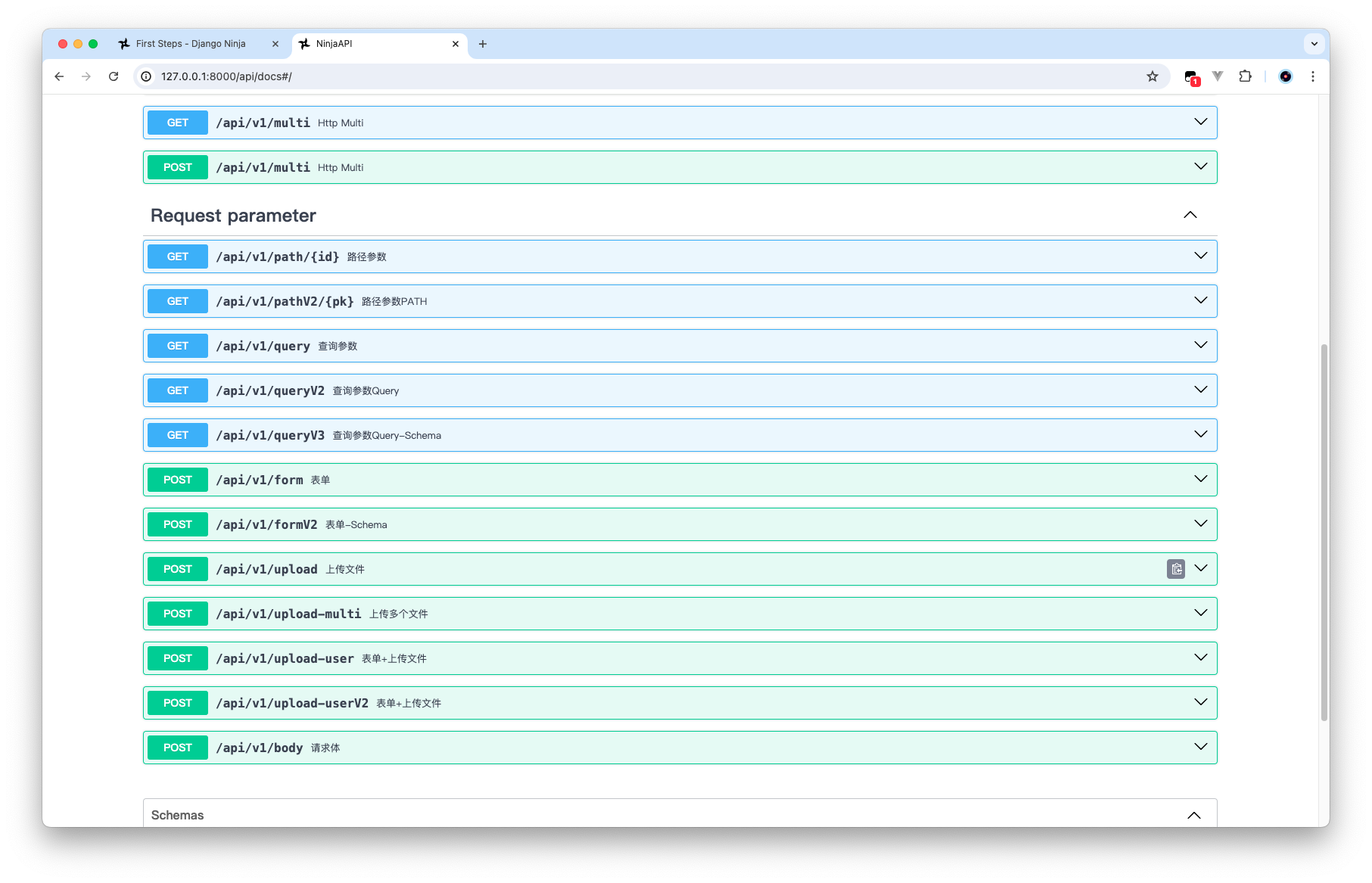
常见请求参数

包括路径参数、查询参数、请求体

1
2
3
4
5
6
7
8
9
10
11
12
13
14
15
16
17
18
19
20
21
22
23
24
25
26
27
28
29
30
31
32
33
34
35
36
37
38
39
40
41
42
43
44
45
46
47
48
49
50
51
52
53
54
55
56
57
58
59
60
61
62
63
64
65
66
67
68
69
70
71
72
73
74
75
76
77
78
79
80
81
82
83
84
85
86
87
88
89
90
91
92
93
94
95
96
97
98
99
# -*- coding:utf-8 -*-
# Author: Zachary
from typing import List

from django.http import HttpRequest
from ninja import Router, Path, Query, Schema, Field, Form, UploadedFile, File


REQ_PARA = Router(tags=["Request parameter"])


# 路径参数
@REQ_PARA.get("/path/{id}", summary="路径参数")
def get_path(request, id: int):
pass


@REQ_PARA.get("/pathV2/{pk}", summary="路径参数PATH")
def get_path_v2(request, pk: int = Path(10, title="主键", alias="primary_key")):
return f"{pk}"


# 查询参数
@REQ_PARA.get("/query", summary="查询参数")
def get_query(request, id: int, age: int = 10):
return f"{id} {age}"


# ... 占位符,表示必填字段
@REQ_PARA.get("/queryV2", summary="查询参数Query")
def get_query_v2(request, name: str = Query(..., title="姓名", description="姓名,...为必填项")):
return f"{name}"


# 查询参数,使用schema定义模型
class QueryFilter(Schema):
age: int = None # 可选项
name: str = Field(..., description="必填项")


# 必填项
@REQ_PARA.get("/queryV3", summary="查询参数Query-Schema")
def get_query_v3(request, data: QueryFilter = Query(...)):
return f"{data}"


# 表单 - 用得少
@REQ_PARA.post("/form", summary="表单")
def post_form(request, username: str = Form(...), password: str = Form(...)):
return f"{username} {password}"


# Schema标注Form
class User(Schema):
username: str
password: str


@REQ_PARA.post("/formV2", summary="表单-Schema")
def post_form2(request, data: User = Form(...)):
return data


# 上传文件
@REQ_PARA.post("/upload", summary="上传文件")
def upload(request, file: UploadedFile = File(...)):
data = file.read()
return {
"name": file.name,
"len": len(data)
}


# 上传多个文件
@REQ_PARA.post("/upload-multi", summary="上传多个文件")
def upload_multi(request, files: List[UploadedFile] = File(...)):
return [file.name for file in files]


class UserDetails(Schema):
name: str
age: int


@REQ_PARA.post("/upload-user", summary="表单+上传文件")
def upload_user(request, details: UserDetails = Form(...), file: UploadedFile = File(...)):
return [details.dict(), file.name]


@REQ_PARA.post("/upload-userV2", summary="表单+上传文件")
def upload_user2(request, details: UserDetails, file: UploadedFile = File(...)):
pass


# 请求体
@REQ_PARA.post("/body", summary="请求体")
def user_body(request, user: UserDetails):
pass

模型序列化

1
2
3
4
5
6
7
8
9
10
11
12
13
14
15
16
17
18
19
20
21
22
23
24
25
26
27
28
29
30
31
32
33
34
35
36
37
38
39
40
41
42
43
44
45
46
47
48
49
50
# -*- coding:utf-8 -*-
# Author: Zachary
from typing import List

from django.contrib.auth.models import Group, User
from django.http import HttpRequest
from ninja import Router, Path, Query, Schema, Field, Form, UploadedFile, File, ModelSchema
from ninja.pagination import paginate


class GroupSchema(ModelSchema):
user: "UserSchema" = None

class Config:
model = Group # 指定模型
model_fields = ['id', 'name']


class UserSchema(ModelSchema):
groups:List[GroupSchema] = []
class Config:
model = User
model_fields = ['id', 'username', 'first_name', 'last_name']
# model_fields = "__all__" # 所有字段
model_fields_optional = ['username'] # 设置字段可不传送


# UserSchema在GroupSchema后面定义的,所以需要加这个才能正常序列化
GroupSchema.update_forward_refs()

SchemaModel = Router(tags=["Schema Model"])


# List[UserSchema] 等价 后面那个接口的生成器
@SchemaModel.get("/schema", response=List[UserSchema], summary="Schema model序列化")
@paginate
def list_users(request):
return User.objects.all()


@SchemaModel.get("/groups")
def list_groups(request):
return [GroupSchema.from_orm(obj) for obj in Group.objects.all()]


@SchemaModel.post("/group", response=GroupSchema, summary="add", tags=["group"])
def add(request, group: GroupSchema):
obj = Group.objects.create(**group.dict())
return obj

写好代码之后

执行一下

python manage.py makemigrations

python manage.py migrate

1
2
3
4
5
6
7
8
9
10
11
12
13
14
15
16
17
18
19
20
21
22
23
24
25
(venv) ➜  ninja_server python manage.py makemigrations
No changes detected
(venv) ➜ ninja_server python manage.py migrate
Operations to perform:
Apply all migrations: admin, auth, contenttypes, sessions
Running migrations:
Applying contenttypes.0001_initial... OK
Applying auth.0001_initial... OK
Applying admin.0001_initial... OK
Applying admin.0002_logentry_remove_auto_add... OK
Applying admin.0003_logentry_add_action_flag_choices... OK
Applying contenttypes.0002_remove_content_type_name... OK
Applying auth.0002_alter_permission_name_max_length... OK
Applying auth.0003_alter_user_email_max_length... OK
Applying auth.0004_alter_user_username_opts... OK
Applying auth.0005_alter_user_last_login_null... OK
Applying auth.0006_require_contenttypes_0002... OK
Applying auth.0007_alter_validators_add_error_messages... OK
Applying auth.0008_alter_user_username_max_length... OK
Applying auth.0009_alter_user_last_name_max_length... OK
Applying auth.0010_alter_group_name_max_length... OK
Applying auth.0011_update_proxy_permissions... OK
Applying auth.0012_alter_user_first_name_max_length... OK
Applying sessions.0001_initial... OK
(venv) ➜ ninja_server

JWT 认证

先安装一下 jwt 依赖

pip3 install python-jose

1
2
3
4
5
6
7
8
9
10
11
12
13
14
15
16
17
18
19
20
21
22
23
24
25
26
27
28
29
30
31
32
33
34
35
36
37
38
39
40
41
42
def generate_token(username: str, expires_delta=None):
"""
生成token
:param username:用户名
:param expires_delta:有效时长
:return:
"""
to_encode = {"sub": username}.copy()
if expires_delta:
expire = datetime.utcnow() + expires_delta
else:
expire = datetime.utcnow() + timedelta(minutes=1)
to_encode.update(dict(exp=expire))
encoded_jwt = jwt.encode(to_encode, "SECRET_KEY", algorithm="HS256")
return encoded_jwt


class TokenAuth(HttpBearer):
def authenticate(self, request, token):
# 解密token
payload = jwt.decode(token, "SECRET_KEY", algorithms=["HS256"])
username: str = payload.get("sub")
# 校验用户是否存在
if username == "zachary":
request.session["user"] = username
return username
else:
return HttpError(404, "user not found")


TokenRouter = Router(tags=["Token"], auth=TokenAuth())


@TokenRouter.get("/token", summary="token", auth=None)
def token(request, user):
token = generate_token(user)
return token


@TokenRouter.get("/check", summary="user")
def check(request):
return request.session.get("user")

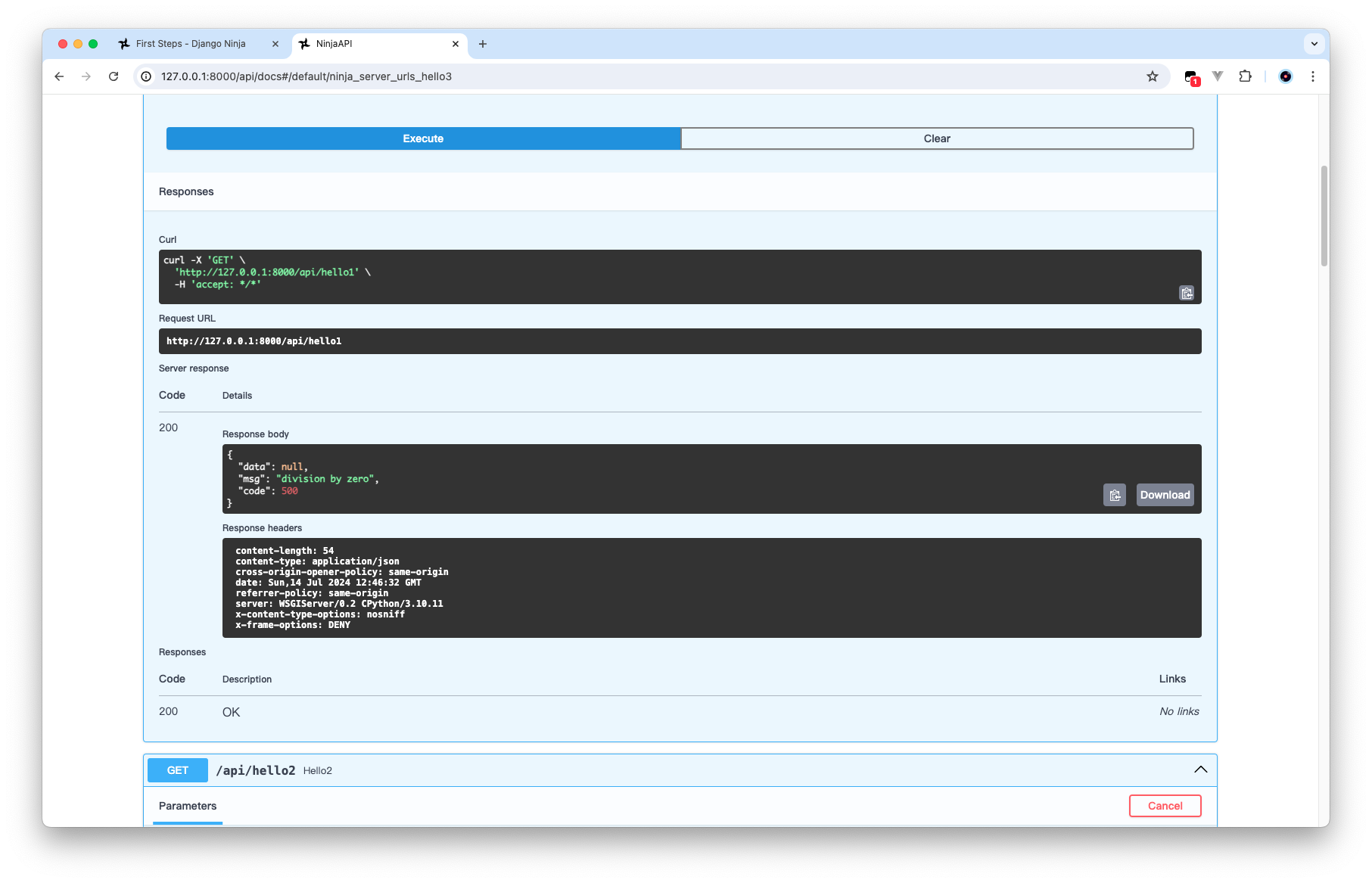
异常处理

写到 urls.py

1
2
3
4
5
6
7
8
9
10
11
12
13
14
15
16
17
18
19
20
21
22
23
24
25
26
27
28
29
30
31
32
33
34
@api.exception_handler(Exception)
def global_exception_handler(request: HttpRequest, exc):
print(exec)
print(request.build_absolute_uri())
print(traceback.format_exc())
return JsonResponse({
"data": None,
"msg": str(exc),
"code": 500
})


@api.exception_handler(HttpError)
def http_error(request: HttpRequest, exc):
return JsonResponse({
"data": None,
"msg": str(exc),
"code": exc.status_code
})


@api.get("/hello1")
def hello(request):
1 / 0


@api.get("/hello2")
def hello2(request):
raise HttpError(404, "user not found")


@api.get("/hello3")
def hello3(request):
raise ValueError("user not found")

更新: 2024-07-14 20:47:56
原文: https://www.yuque.com/zacharyblock/cx2om6/oukufzfyh2p6vb38