个人页面

文件上传与下载

依赖包

需要安装一下werkzeug这个包

1
2
3
4
5
6
fastapi[all]
mysqlclient==2.1.1
SQLAlchemy==2.0.23
pyjwt
passlib[bcrypt]
werkzeug

fileApi

为了实现头像上传的功能创建一个新的fileApi.py

注意:

  • StreamingResponse 引得是from fastapi.responses import StreamingResponse
  • secure_filename 引得是from werkzeug.utils import secure_filename
1
2
3
4
5
6
7
8
9
10
11
12
13
14
15
16
17
18
19
20
21
22
23
24
25
26
27
28
29
30
31
32
33
34
35
36
37
38
39
40
41
42
43
44
45
46
47
48
49
50
51
52
53
54
55
56
57
58
59
60
61
62
# -*- coding:utf-8 -*-
# Author: Zachary
import mimetypes
import os
from datetime import datetime
from fastapi.encoders import jsonable_encoder
from werkzeug.utils import secure_filename
from fastapi.responses import StreamingResponse
from fastapi import APIRouter, UploadFile

from api import app
from common.constant import HOST, PORT
from common.profile import Profile
from common.result import ResultModel, Result
from exception.customException import FileNotFoundException

file_router = APIRouter(prefix="/files")


@file_router.post("/upload", response_model=ResultModel)
async def upload(file: UploadFile):
original_filename = secure_filename(file.filename)
timestamp = int(datetime.now().timestamp())
unique_filename = f"{timestamp}_{original_filename}"
file_save_path = Profile.get_files_path()

# 创建保存文件的完整路径
file_final_path = file_save_path.joinpath(unique_filename)

# 将文件保存到指定位置
with open(file_final_path, 'wb') as buffer_file:
content = await file.read()
buffer_file.write(content)

# 构建文件访问URL
url = f"http://{HOST}:{PORT}/files/download?filename={unique_filename}"
return Result.success(jsonable_encoder({"url": url}))


@file_router.get("/download")
async def download(filename: str):
file_save_path = Profile.get_files_path()
file_path = file_save_path.joinpath(filename)

if not file_path.exists():
raise FileNotFoundException("文件不存在")
# 用于触发下载文件的
# return FileResponse(file_path, media_type='image/png', filename=filename)

mime_type, _ = mimetypes.guess_type(file_path)

# 创建一个StreamingResponse,以便流式传输大文件,同时设置正确的MIME类型
response = StreamingResponse(
open(file_path, 'rb'),
media_type=mime_type,
)
# 不设置Content-Disposition,避免浏览器触发下载
return response


app.include_router(file_router)

1
2
3
4
5
6
7
8
9
10
11
12
13
14
15
16
17
18
19
20
# -*- coding:utf-8 -*-
# Author: Zachary

from fastapi import FastAPI
from starlette.middleware.cors import CORSMiddleware

app = FastAPI()

# 跨域问题
origins = ["http://localhost:5173", "http://127.0.0.1:5173"] # 替换为你的前端应用的实际地址

app.add_middleware(
CORSMiddleware,
allow_origins=origins, # 允许跨域访问的来源域名列表
allow_credentials=True, # 是否允许携带cookie
allow_methods=["*"], # 允许的方法,默认包含常见的GET、POST等,"*"表示所有方法
allow_headers=["*"], # 允许的请求头,默认包含常见的Content-Type等,"*"表示所有请求头
)

from api import adminApi, exceptionHandler, courseApi, studentApi, fileApi

Profile

在项目目录/common下创建一个profile.py,用于获取项目目录路径

1
2
3
4
5
6
7
8
9
10
11
12
13
14
15
16
17
18
# -*- coding:utf-8 -*-
# Author: Zachary

from pathlib import Path


class Profile:
__file_path = None

@staticmethod
def get_files_path():
project_path = Path(__file__).parent.parent # 获取项目根目录
file_path = project_path.joinpath("files")
if not file_path.exists():
file_path.mkdir(parents=True)
Profile.__file_path = file_path
return file_path

自定义异常

1
2
3
4
5
6
7
8
9
10
11
12
13
14
15
16
17
18
19
20
21
22
23
24
25
26
27
28
29
30
31
32
33
34
35
36
# -*- coding:utf-8 -*-
# Author: Zachary

class UserNotFoundException(Exception):
def __init__(self, message: str):
self.message = message


class UserExistException(Exception):
def __init__(self, message: str):
self.message = message


class PasswordNotMatchException(Exception):
def __init__(self, message: str):
self.message = message


class TokenException(Exception):
def __init__(self, message: str):
self.message = message


class CourseExistException(Exception):
def __init__(self, message: str):
self.message = message


class CourseNotExistException(Exception):
def __init__(self, message: str):
self.message = message


class FileNotFoundException(Exception):
def __init__(self, message: str):
self.message = message
1
2
3
4
5
6
7
8
9
10
11
12
13
14
15
16
17
18
19
20
21
22
23
24
25
26
27
28
29
30
31
32
33
34
35
36
37
38
39
40
41
42
43
44
45
46
47
48
49
50
51
52
53
54
55
56
57
58
59
60
# -*- coding:utf-8 -*-
# Author: Zachary
from fastapi.encoders import jsonable_encoder
from starlette.responses import JSONResponse

from api import app
from fastapi import Request

from common.result import Result
from exception.customException import UserNotFoundException, PasswordNotMatchException, TokenException, \
CourseExistException, CourseNotExistException, UserExistException, FileNotFoundException


@app.exception_handler(Exception)
async def exception_handler(request: Request, exc: Exception):
result = Result.error(code="500", msg=str(exc))
return JSONResponse(status_code=500, content=jsonable_encoder(result))


@app.exception_handler(UserNotFoundException)
async def user_not_fount_exception_handler(request: Request, exc: UserNotFoundException):
result = Result.error(code="404", msg=exc.message)
return JSONResponse(status_code=404, content=jsonable_encoder(result))


@app.exception_handler(PasswordNotMatchException)
async def password_not_fount_exception_handler(request: Request, exc: PasswordNotMatchException):
result = Result.error(code="401", msg=exc.message)
return JSONResponse(status_code=401, content=jsonable_encoder(result))


@app.exception_handler(TokenException)
async def token_exception_handler(request: Request, exc: TokenException):
result = Result.error(code="401", msg=exc.message)
return JSONResponse(status_code=401, content=jsonable_encoder(result))


@app.exception_handler(CourseExistException)
async def course_exist_exception_handler(request: Request, exc: CourseExistException):
result = Result.error(code="400", msg=exc.message)
return JSONResponse(status_code=400, content=jsonable_encoder(result))


@app.exception_handler(CourseNotExistException)
async def course_not_exist_exception_handler(request: Request, exc: CourseNotExistException):
result = Result.error(code="404", msg=exc.message)
return JSONResponse(status_code=404, content=jsonable_encoder(result))


@app.exception_handler(UserExistException)
async def user_exist_exception_handler(request: Request, exc: UserExistException):
result = Result.error(code="400", msg=exc.message)
return JSONResponse(status_code=400, content=jsonable_encoder(result))


@app.exception_handler(FileNotFoundException)
async def file_not_found_exception_handler(request: Request, exc: FileNotFoundException):
result = Result.error(code="404", msg=exc.message)
return JSONResponse(status_code=404, content=jsonable_encoder(result))

测试

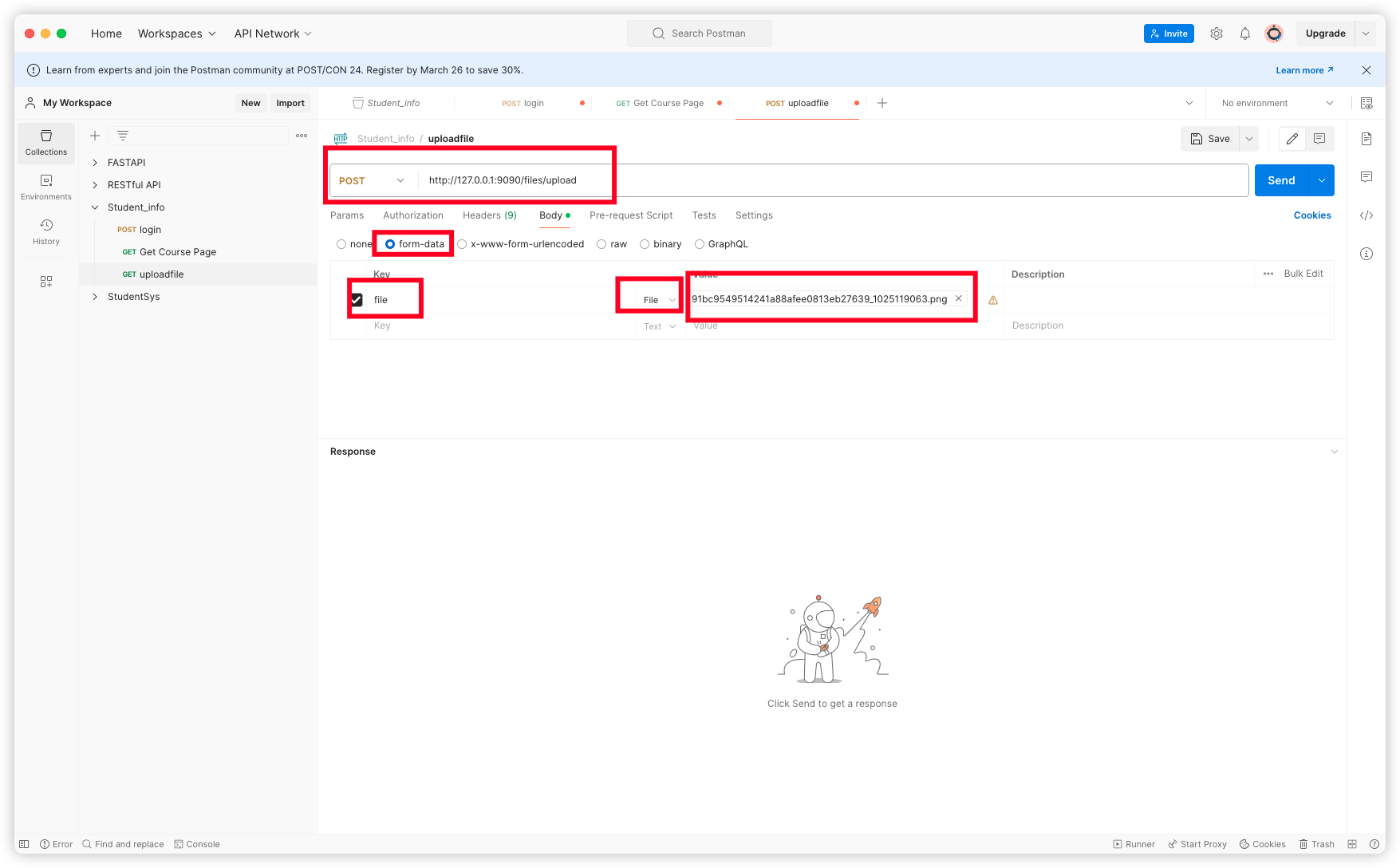
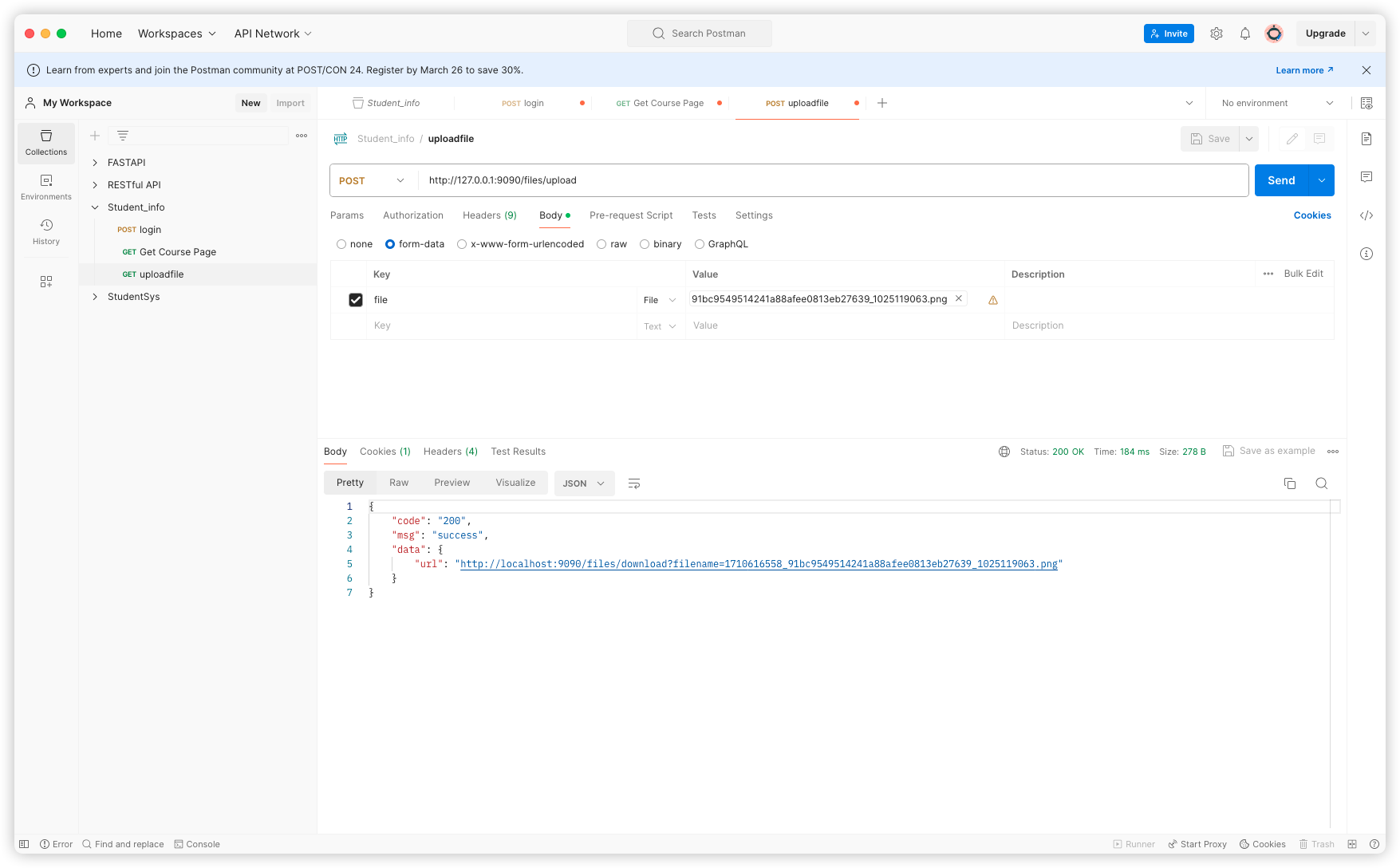
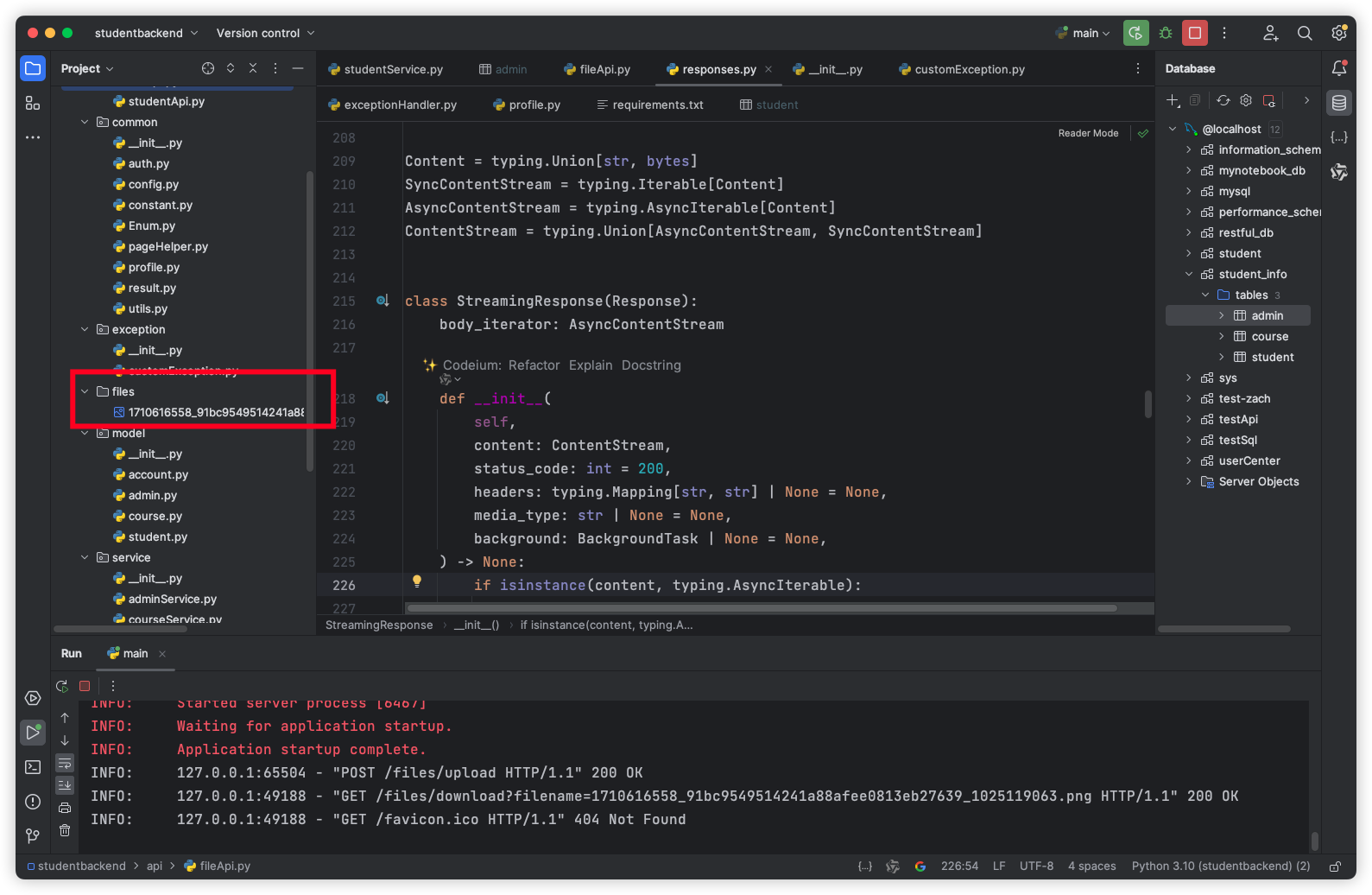
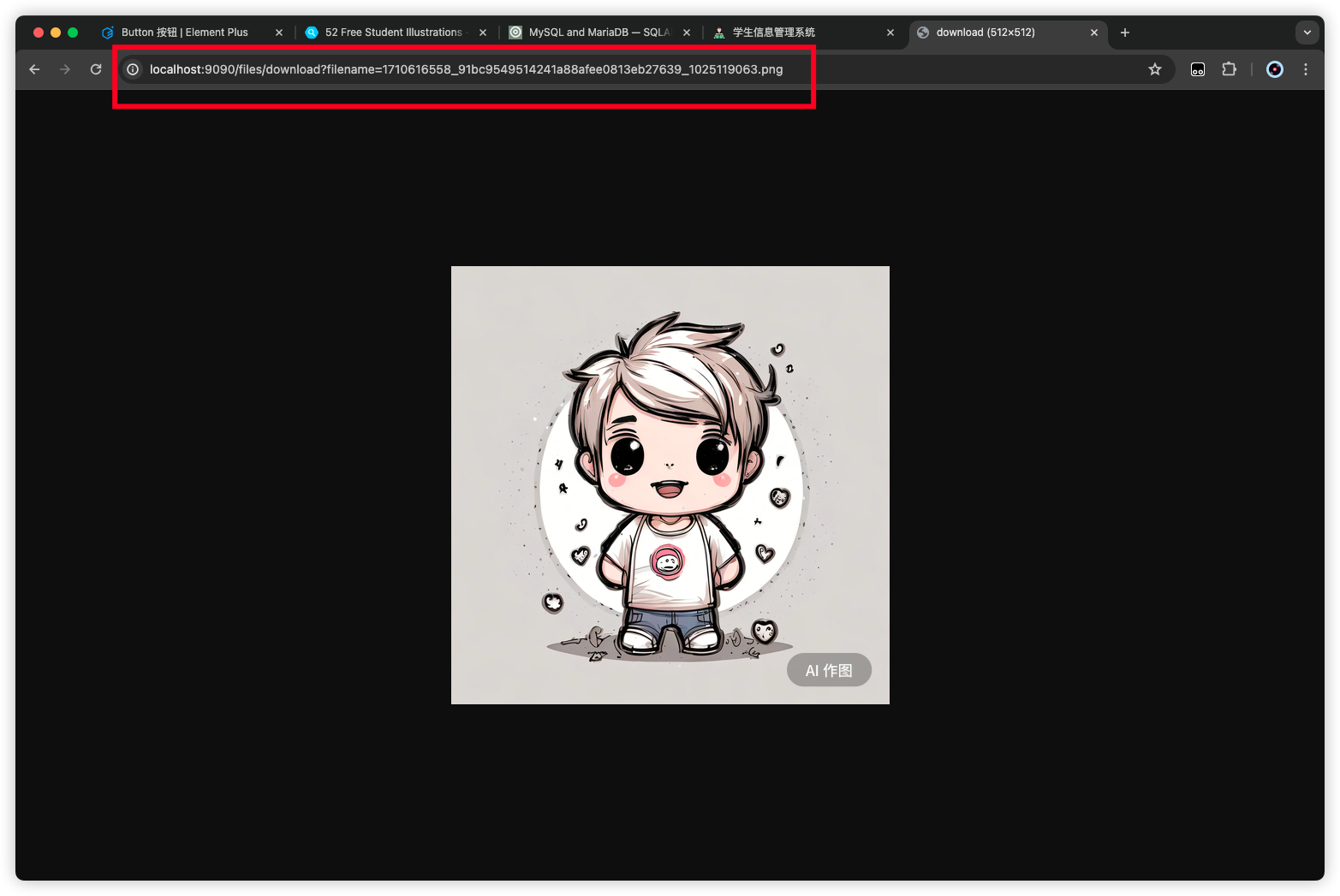
使用 postman 测试一下

上传

下载

完善图片上传

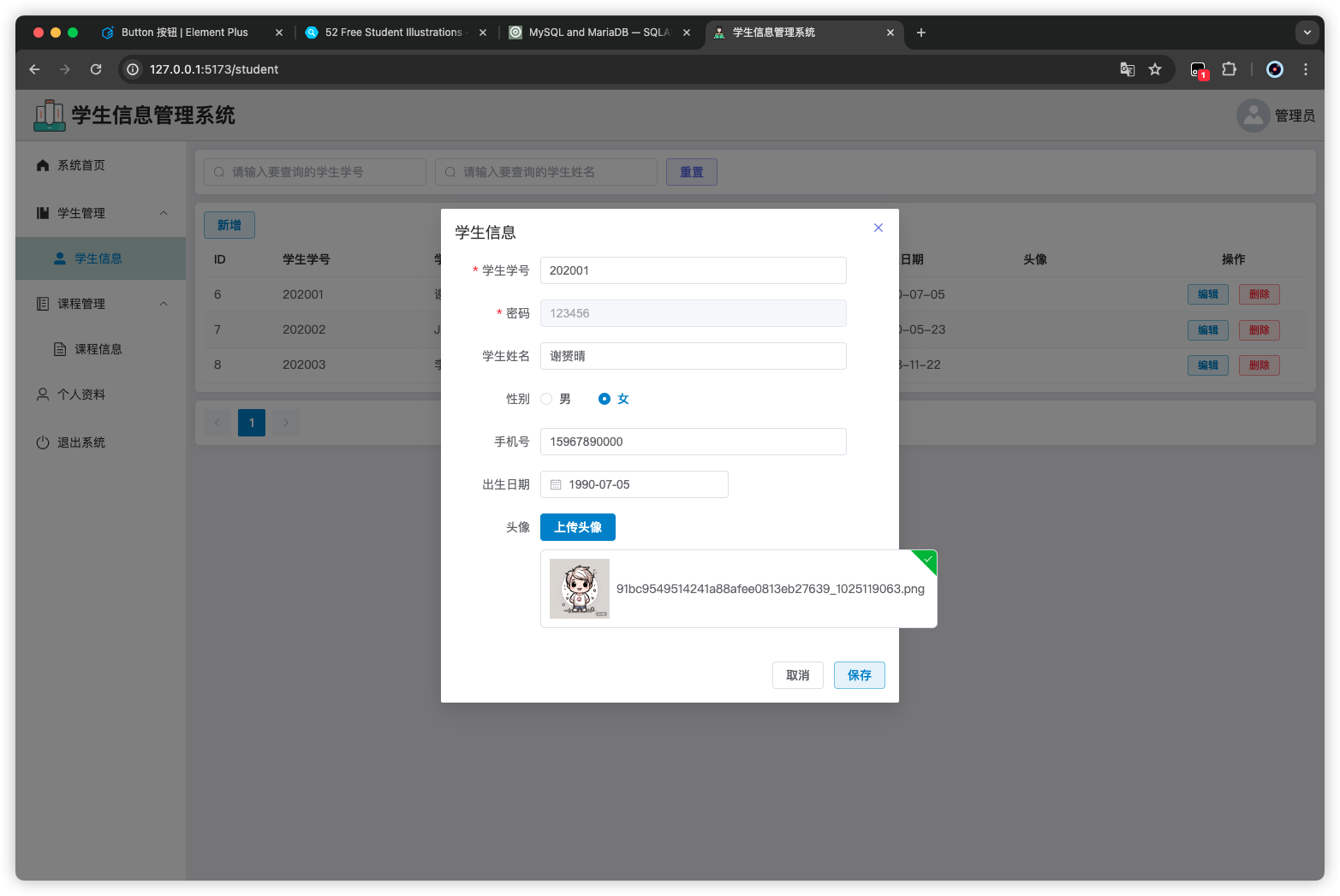
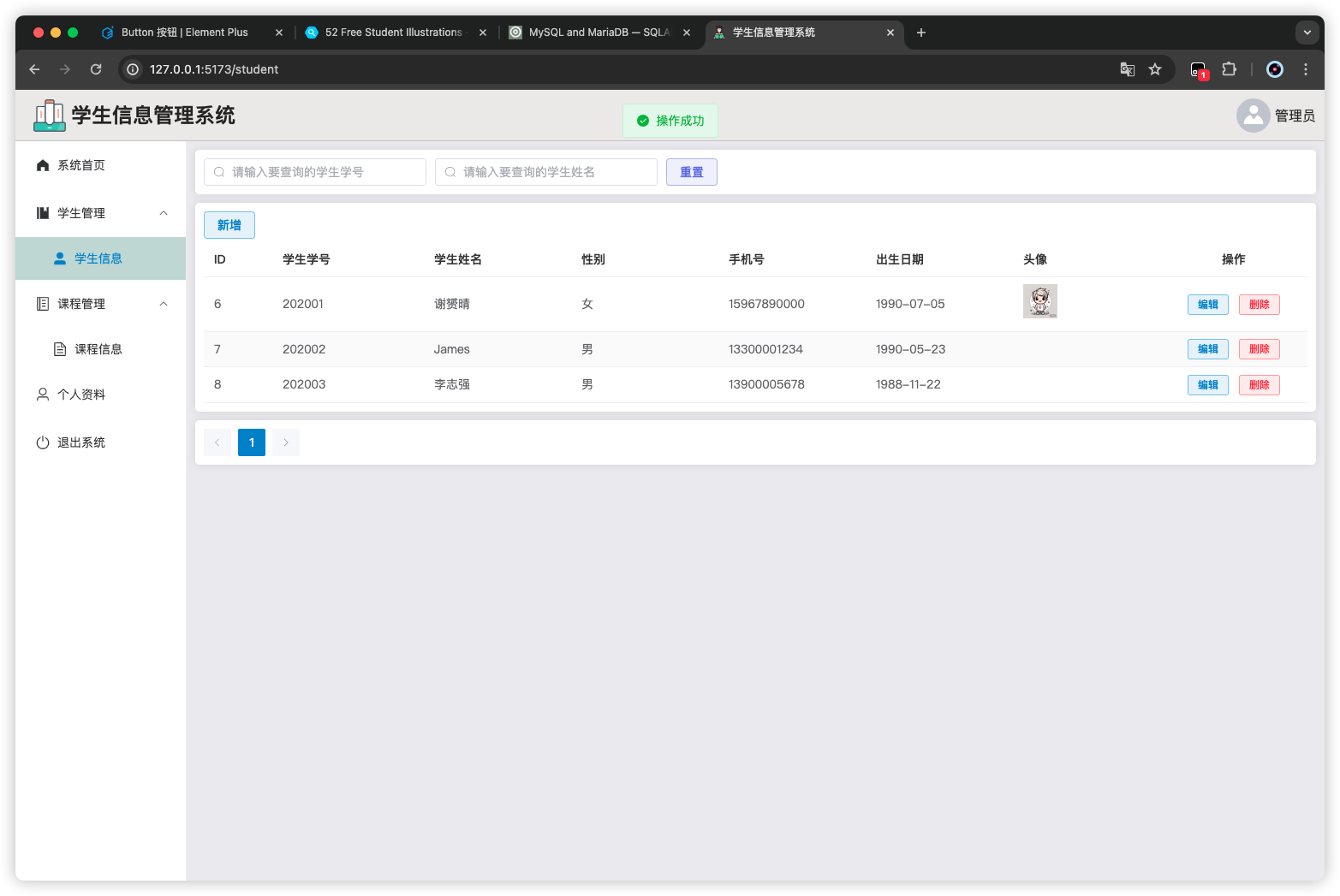
修改一下Student.vue头像上传的功能

1
2
3
4
5
6
7
8
9
10
11
12
13
14
15
16
17
18
19
20
21
22
23
24
25
26
27
28
29
30
31
32
33
34
35
36
37
38
39
40
41
42
43
44
45
46
47
48
49
50
51
52
53
54
55
56
57
58
59
60
61
62
63
64
65
66
67
68
69
70
71
72
73
74
75
76
77
78
79
80
81
82
83
84
85
86
87
88
89
90
91
92
93
94
95
96
97
98
99
100
101
102
103
104
105
106
107
108
109
110
111
112
113
114
115
116
117
118
119
120
121
122
123
124
125
126
127
128
129
130
131
132
133
134
135
136
137
138
139
140
141
142
143
144
145
146
147
148
149
150
151
152
153
154
155
156
157
158
159
160
161
162
163
164
165
166
167
168
169
170
171
172
173
174
175
176
177
178
179
180
181
182
183
184
185
186
187
188
189
190
191
192
193
194
195
196
197
198
199
200
201
202
203
204
205
206
207
208
209
210
211
212
213
214
215
216
217
218
219
220
221
222
223
224
225
226
227
228
229
230
231
232
233
234
235
236
237
238
239
240
241
242
243
244
245
246
247
248
249
250
251
252
253
254
255
256
257
258
259
260
261
262
263
264
265
266
267
268
<template>
<div>
<div class="card" style="margin-bottom: 10px">
<el-input
@input="load"
style="width: 260px"
v-model="data.username"
placeholder="请输入要查询的学生学号"
:prefix-icon="Search"
/>
<el-input
@input="load"
style="margin-left:10px; width: 260px"
v-model="data.name"
placeholder="请输入要查询的学生姓名"
:prefix-icon="Search"
/>
<el-button type="info" plain style="margin: 0 0 0 10px" @click="reset"
>重置</el-button
>
</div>

<div class="card" style="margin-bottom: 10px">
<div>
<el-button
type="primary"
style="margin-bottom: 5px"
plain
@click="handleAdd"
>新增</el-button
>
</div>
<div>
<el-table :data="data.tableData" stripe style="width: 100%">
<el-table-column prop="id" label="ID" width="80" />
<el-table-column prop="username" label="学生学号" />
<el-table-column prop="name" label="学生姓名" />
<el-table-column prop="gender" label="性别" />
<el-table-column prop="phone" label="手机号" />
<el-table-column prop="birthday" label="出生日期" />

<el-table-column prop="avatar" label="头像">
<template #default="scope">
<el-image
v-if="scope.row.avatar"
:src="scope.row.avatar"
:preview-src-list="[scope.row.avatar]"
style="width: 40px; height: 40px"
></el-image>
</template>
</el-table-column>

<el-table-column label="操作" align="center">
<template #default="scope">
<el-button
type="primary"
size="small"
plain
@click="handleEdit(scope.row)"
>编辑</el-button
>
<el-button
type="danger"
size="small"
plain
@click="handleDelete(scope.row.id)"
>删除</el-button
>
</template>
</el-table-column>
</el-table>
</div>
</div>

<div class="card">
<el-pagination
v-model:current-page="data.pageNum"
v-model:page-size="data.pageSize"
@current-change="handleCurrentChange"
background
layout="prev, pager, next"
:total="data.total"
/>
</div>

<el-dialog width="35%" v-model="data.formVisible" title="学生信息">
<el-form
:model="data.form"
:rules="rules"
ref="formRef"
label-width="100px"
label-position="right"
style="padding-right: 45px"
>
<el-form-item label="学生学号" prop="username">
<el-input v-model="data.form.username" autocomplete="off" />
</el-form-item>
<el-form-item label="密码" prop="password">
<el-input v-model="data.form.password" autocomplete="off" disabled />
</el-form-item>
<el-form-item label="学生姓名">
<el-input v-model="data.form.name" autocomplete="off" />
</el-form-item>
<el-form-item label="性别">
<el-radio-group v-model="data.form.gender">
<el-radio label="男"></el-radio>
<el-radio label="女"></el-radio>
</el-radio-group>
</el-form-item>
<el-form-item label="手机号">
<el-input v-model="data.form.phone" autocomplete="off" />
</el-form-item>
<el-form-item label="出生日期">
<el-date-picker
format="YYYY-MM-DD"
value-format="YYYY-MM-DD"
v-model="data.form.birthday"
></el-date-picker>
</el-form-item>
<el-form-item label="头像">
<el-upload
action="http://localhost:9090/files/upload"
list-type="picture"
:on-success="handleImgUploadSuccess"
>
<el-button type="primary">上传头像 </el-button>
</el-upload>
</el-form-item>
</el-form>
<template #footer>
<span class="dialog-footer">
<el-button @click="data.formVisible = false" plain>取消</el-button>
<el-button type="primary" @click="save" plain>保存</el-button>
</span>
</template>
</el-dialog>
</div>
</template>

<script setup>
import { reactive, ref } from "vue";
import { Search } from "@element-plus/icons-vue";
import request from "@/utils/request";
import { ElMessage, ElMessageBox } from "element-plus";

const data = reactive({
username: "",
name: "",
tableData: [],
total: 0,
pageNum: 1,
pageSize: 5,
formVisible: false,
form: { password: "123456" },
});

const load = () => {
request
.get("/student/selectPage", {
params: {
pageNum: data.pageNum,
pageSize: data.pageSize,
username: data.username,
name: data.name,
},
})
.then((res) => {
if (res.code === "200") {
data.tableData = res.data?.list || [];
data.total = res.data?.total || 0;
} else {
ElMessage.error(res.msg);
}
})
.catch((err) => {
if (err.response?.data?.code === "401") {
localStorage.removeItem("student-user");
}
ElMessage.error(err.response?.data?.msg || err.message);
});
};

// 加载一次 获取课程数据
load();

const handleCurrentChange = () => {
// 当翻页的时候重新加载数据
load();
};

const reset = () => {
data.username = "";
data.name = "";
load();
};

const rules = reactive({
username: [{ required: true, message: "请输入学生学号", trigger: "blur" }],
password: [{ required: true, message: "请输入密码", trigger: "blur" }],
});

const formRef = ref();

const handleAdd = () => {
data.formVisible = true;
data.form = { password: "123456" };
};

const save = () => {
formRef.value.validate((valid) => {
if (valid) {
request
.request({
url: data.form.id ? "/student/update" : "/student/add",
method: data.form.id ? "put" : "post",
data: data.form,
})
.then((res) => {
if (res.code === "200") {
ElMessage.success("操作成功");
data.formVisible = false;
load();
} else {
ElMessage.error(res.msg);
}
})
.catch((err) => {
if (err.response?.data?.code === "401") {
localStorage.removeItem("student-user");
}
ElMessage.error(err.response?.data?.msg || err.message);
});
}
});
};

const handleEdit = (row) => {
data.form = JSON.parse(JSON.stringify(row));
data.formVisible = true;
data.form.password = "123456";
};

const handleDelete = (id) => {
ElMessageBox.confirm("删除后内容将无法恢复,您确认删除嘛?", "删除确认", {
type: "warning",
})
.then((res) => {
request.delete("/student/delete/" + id).then((res) => {
if (res.code === "200") {
ElMessage.success("删除成功");
load();
} else {
ElMessage.error(res.msg);
}
});
})
.catch((err) => {
if (err.response?.data?.code === "401") {
localStorage.removeItem("student-user");
}
ElMessage.error(err.response?.data?.msg || err.message);
});
};

const handleImgUploadSuccess = (res) => {
data.form.avatar = res.data.url;
};
</script>

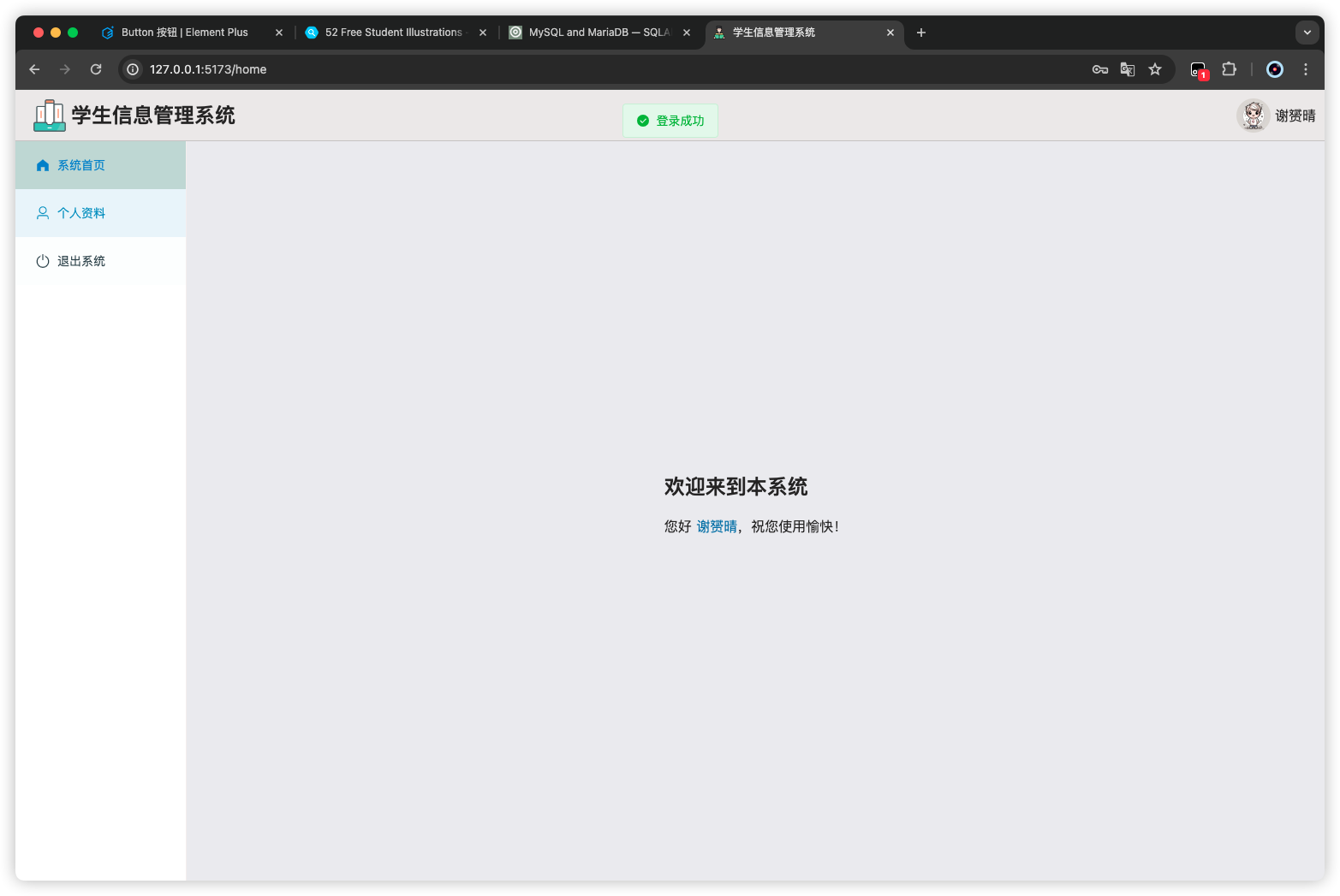
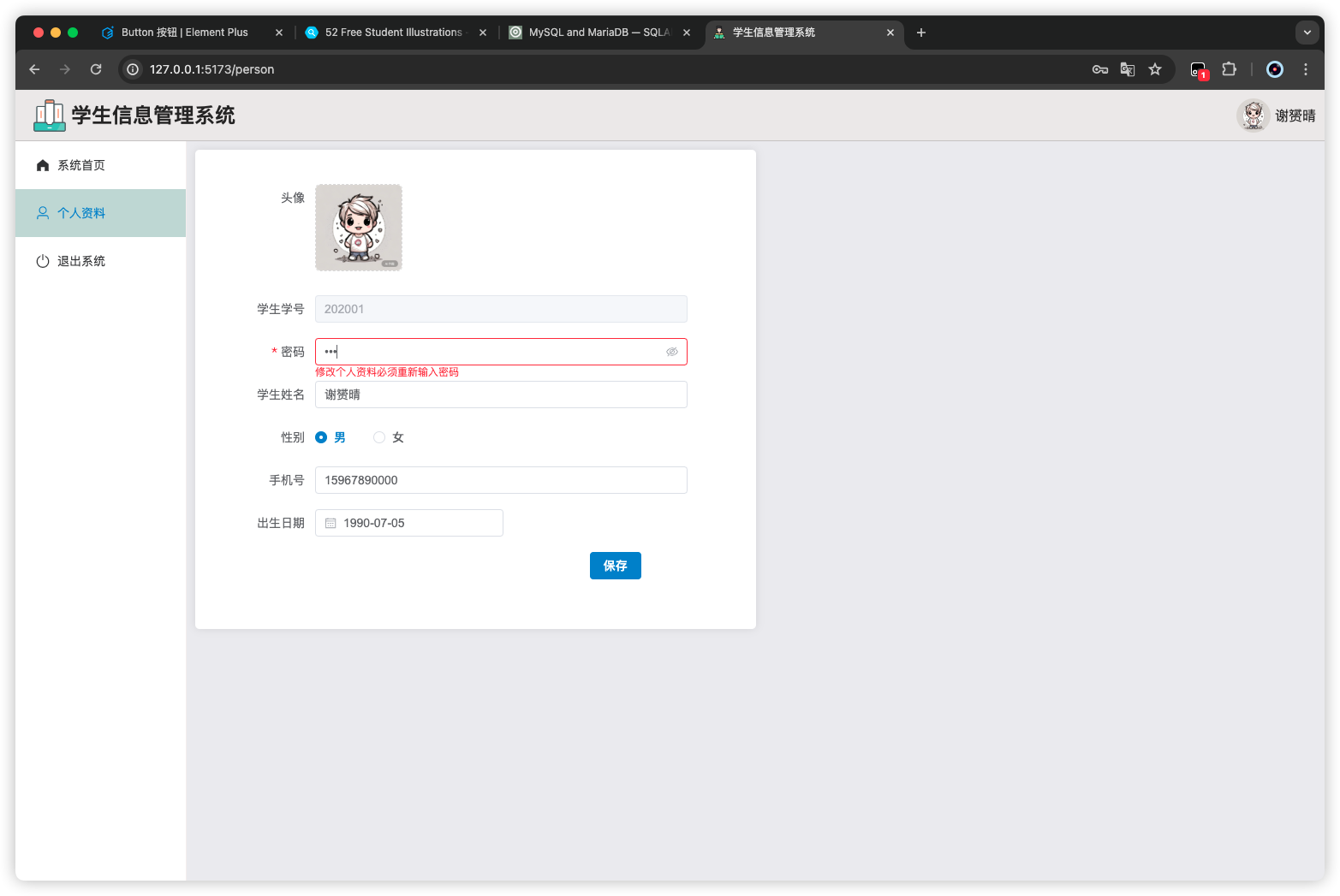
个人资料

在项目目录/manager文件夹下面创建一个Person.vue

1
2
3
4
5
6
7
8
9
10
11
12
13
14
15
16
17
18
19
20
21
22
23
24
25
26
27
28
29
30
31
32
33
34
35
36
37
38
39
40
41
42
43
44
45
46
47
48
49
50
51
52
53
54
55
56
57
58
59
60
61
62
63
64
65
66
67
68
69
70
71
72
73
74
75
76
77
78
79
80
81
82
83
84
85
86
87
88
89
90
91
92
93
94
95
96
97
98
99
100
101
102
103
104
105
106
107
108
109
110
111
112
113
114
115
116
117
118
119
120
121
122
123
124
125
126
127
128
129
130
131
132
133
134
135
136
137
138
139
140
<template>
<div>
<div class="card" style="width: 50%; padding: 40px">
<el-form
:model="data.form"
ref="formRef"
:rules="rules"
label-width="100px"
label-position="right"
style="padding-right: 40px"
>
<el-form-item label="头像">
<el-upload
class="avatar-uploader"
action="http://localhost:9090/files/upload"
:show-file-list="false"
:on-success="handleImgUploadSuccess"
>
<img
v-if="data.form.avatar"
:src="data.form.avatar"
class="avatar"
/>
<el-icon v-else class="avatar-uploader-icon">
<Plus />
</el-icon>
</el-upload>
</el-form-item>
<el-form-item label="学生学号" prop="username">
<el-input v-model="data.form.username" autocomplete="off" disabled />
</el-form-item>
<el-form-item label="密码" prop="password">
<el-input
show-password
v-model="data.form.password"
autocomplete="off"
/>
</el-form-item>
<el-form-item label="学生姓名">
<el-input v-model="data.form.name" autocomplete="off" />
</el-form-item>
<el-form-item label="性别">
<el-radio-group v-model="data.form.gender">
<el-radio label="男"></el-radio>
<el-radio label="女"></el-radio>
</el-radio-group>
</el-form-item>
<el-form-item label="手机号">
<el-input v-model="data.form.phone" autocomplete="off" />
</el-form-item>
<el-form-item label="出生日期">
<el-date-picker
format="YYYY-MM-DD"
value-format="YYYY-MM-DD"
v-model="data.form.birthday"
></el-date-picker>
</el-form-item>
<el-form-item style="padding-left: 60%">
<el-button type="primary" @click="update">保存</el-button>
</el-form-item>
</el-form>
</div>
</div>
</template>

<script setup>
import { ref, reactive } from "vue";
import { Plus } from "@element-plus/icons-vue";
import request from "@/utils/request";
import { ElMessage } from "element-plus";
import router from "@/router";

const data = reactive({
form: JSON.parse(localStorage.getItem("student-user") || "{}"),
});

if (data.form) {
data.form.password = "";
}

const rules = reactive({
username: [{ required: true, message: "请输入账号", trigger: "blur" }],
password: [
{
required: true,
message: "修改个人资料必须重新输入密码",
trigger: "blur",
},
],
});

const update = () => {
request
.put("/student/update", data.form)
.then((res) => {
if (res.code === "200") {
ElMessage.success("操作成功");
router.push("/login");
} else {
ElMessage.error(res.msg);
}
})
.catch((err) => {
ElMessage.error(err.response?.data?.msg || err.message);
});
};

const handleImgUploadSuccess = (res) => {
data.form.avatar = res.data;
};
</script>

<style>
.avatar-uploader .el-upload {
border: 1px dashed #d9d9d9;
border-radius: 6px;
cursor: pointer;
position: relative;
overflow: hidden;
}

.avatar-uploader .el-upload:hover {
border-color: #409eff;
}

.el-icon.avatar-uploader-icon {
font-size: 28px;
color: #8c939d;
width: 100px;
height: 100px;
line-height: 100px;
text-align: center;
}

.avatar {
width: 100px;
height: 100px;
display: block;
}
</style>
1
2
3
4
5
6
7
8
9
10
11
12
13
14
15
16
17
18
19
20
21
22
23
24
25
26
27
28
29
30
31
32
33
34
35
36
37
38
39
40
41
42
43
44
45
46
47
48
49
50
51
52
53
54
55
56
57
58
59
60
61
62
import { createRouter, createWebHistory } from "vue-router";

const router = createRouter({
history: createWebHistory(import.meta.env.BASE_URL),
routes: [
{
path: "/",
name: "Manager",
component: () => import("@/views/Manager.vue"),
redirect: "/home",
children: [
{
path: "home",
name: "Home",
component: () => import("@/views/manager/Home.vue"),
meta: { requiresAuth: true },
},
{
path: "course",
name: "Course",
component: () => import("@/views/manager/Course.vue"),
meta: { requiresAuth: true },
},
{
path: "student",
name: "Student",
component: () => import("@/views/manager/Student.vue"),
meta: { requiresAuth: true },
},
{
path: "person",
name: "Person",
component: () => import("@/views/manager/Person.vue"),
meta: { requiresAuth: true },
},
],
},
{
path: "/login",
name: "Login",
component: () => import("@/views/Login.vue"),
},
{
path: "/register",
name: "Register",
component: () => import("@/views/Register.vue"),
},
],
});

router.beforeEach((to, from, next) => {
const requiresAuth = to.matched.some((record) => record.meta.requiresAuth);
const user = JSON.parse(localStorage.getItem("student-user"));
if (requiresAuth && !user) {
// 如果目标路由需要认证,并且用户未登录
next("/login"); // 跳转到登录页面
} else {
next(); // 如果目标路由不需要认证,或者用户已登录,则正常导航到目标路由
}
});

export default router;
1
2
3
4
5
6
7
8
9
10
11
12
13
14
15
16
17
18
19
20
21
22
23
24
25
26
27
28
29
30
31
32
33
34
35
36
37
38
39
40
41
42
43
44
45
46
47
48
49
50
51
52
53
54
55
56
57
58
59
60
61
62
63
64
65
66
67
68
69
70
71
72
73
74
75
76
77
78
79
80
81
82
83
84
85
86
87
88
89
90
91
92
93
94
95
96
97
98
99
100
101
102
103
104
105
106
107
108
109
110
111
112
113
114
115
116
117
118
119
120
121
122
123
<template>
<div>
<div
style="height: 60px; background-color: #eae8e8; display: flex; align-items: center; border-bottom: 1px solid #c4c2c2"
>
<div style="flex: 1">
<div style="padding-left: 20px; display: flex; align-items: center">
<img src="@/assets/imgs/logo.png" alt="" style="width: 40px" />
<div style="font-weight: bold; font-size: 24px; margin-left: 5px">
学生信息管理系统
</div>
</div>
</div>
<div
style="width: fit-content; padding-right: 10px; display: flex; align-items: center;"
>
<img
:src="
user.avatar ||
'https://cube.elemecdn.com/3/7c/3ea6beec64369c2642b92c6726f1epng.png'
"
alt=""
style="width: 40px; height: 40px; border-radius: 50%"
/>
<span style="margin-left: 5px">{{ user.name }}</span>
</div>
</div>

<div style="display: flex">
<div
style="width: 200px; border-right: 1px solid #f3eeee; min-height: calc(100vh - 60px)"
>
<el-menu
router
style="border: none"
:default-active="$route.path"
:default-openeds="['/home', '2', '3']"
>
<el-menu-item index="/home">
<el-icon>
<HomeFilled />
</el-icon>
<span>系统首页</span>
</el-menu-item>

<el-sub-menu index="2" v-if="user.role === 'ADMIN'">
<template #title>
<el-icon>
<Management />
</el-icon>
<span>学生管理</span>
</template>
<el-menu-item index="/student">
<el-icon>
<UserFilled />
</el-icon>
<span>学生信息</span>
</el-menu-item>
</el-sub-menu>

<el-sub-menu index="3" v-if="user.role === 'ADMIN'">
<template #title>
<el-icon>
<Memo />
</el-icon>
<span>课程管理</span>
</template>
<el-menu-item index="/course">
<el-icon>
<Document />
</el-icon>
<span>课程信息</span>
</el-menu-item>
</el-sub-menu>

<el-menu-item index="/person" v-if="user.role === 'STUDENT'">
<el-icon>
<User />
</el-icon>
<span>个人资料</span>
</el-menu-item>
<el-menu-item index="/login" @click="logout">
<el-icon>
<SwitchButton />
</el-icon>
<span>退出系统</span>
</el-menu-item>
</el-menu>
</div>

<div style="flex: 1; width: 0; background-color: #eaeaee; padding: 10px">
<router-view />
</div>
</div>
</div>
</template>

<script setup>
import { useRoute } from "vue-router";

const $route = useRoute();
console.log($route.path);

const logout = () => {
localStorage.removeItem("student-user");
};

const user = JSON.parse(localStorage.getItem("student-user") || "{}");
</script>

<style scoped>
.el-menu-item.is-active {
background-color: #c3d7d3 !important;
}

.el-menu-item:hover {
color: #0c98d5;
}

:deep(th) {
color: #333;
}
</style>